
Your modern photo library for Windows. The installer sets up everything automatically — no prerequisites needed.
Your browser may flag this .exe as suspicious or block it outright. This is a standard precaution for brand‑new software that hasn’t yet built a reputation.
If you see a warning, choose “Keep” or “Download anyway” — the file is safe.
Chrome, Edge, and Firefox all use reputation‑based filtering for new executables.
Still unsure? You can verify the file's safety using independent online scanners:
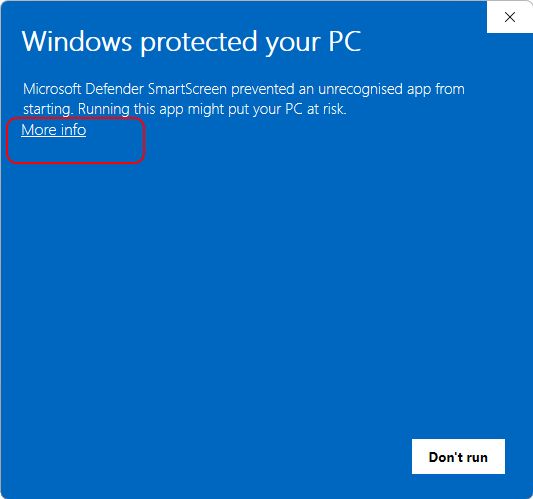
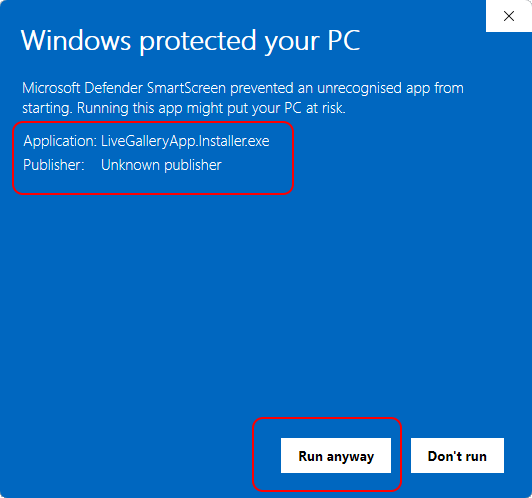
Windows may warn about unfamiliar software. This is normal for newly published apps. To proceed:
Questions? Contact support.
This is because we need to install components that require elevated permissions. (.NET 10 and Windows App SDK 1.8)
On modern Windows there are two ways to install a program:
For this beta, we have implemented option 2 only. You will be prompted for administrator credentials during installation.
A per‑user installer is planned for a future update.
Compare the hash below with LiveGalleryApp.Installer.exe.sha256 to confirm the file is genuine.